Before you decide to buy a smartphone, have you ever wondered how to detect fake android phones in Nigeria? Mobile phones have become very important these days. We use them for making calls, chatting, browsing the internet, taking pictures, and make use of apps, among others. Android phones are very common in Nigeria as they have different types, brands, and prices. Nowadays, there are so many sales of fake Android phones that look exactly like the original ones, and this is very sad. You can end up buying a fake phone, thinking it’s the original, among others. This article will help you identify fake Android phones in Nigeria before buying. These tips will guide you to be a safe shopper, either online or in a store offline, so you’ll get value for your money. What is a fake Android phone? A cloned phone is an imitation phone. It’s designed after the real one but not in the real company. For example, someone can design a phone that looks like a Samsung or Infinix or Tecno phone but the inside is different. The parts used to make these phones are most times low quality and will wear out easily. They can also use fake logos and names. Why are fake phones bad? Fake Android phones have many problems, such as: That’s why you should always check well before buying a phone. How to detect fake Android phones in Nigeria before you buy Here are simple and easy ways to know if a phone is fake: 1. Check the phone box First thing to do is to check the box of the phone. Genuine phones are packaged in a neat, strong box, well sealed with quality materials. The box should be well labelled with the name, logo and other labels. And also, the name and logo should be printed clearly without any mistakes in the spelling and also without the spelling being faded. The phone, a charger, earphones (if included), a user manual and in some cases, a warranty card or the list of the service centres should be found inside the box. The items should be arranged correctly and should not appear rushed and dirty. Be wary when the box is cheap, scuffy, low quality, has spelling errors, is opened or tampered with. It may be a fake phone, and you might be cheated. 2. Check the phone’s build and design Fake phones are almost similar to the original, though not but not when you take a closer look. Always check the phone at least a day before buying. Look at the brand sign, the camera shape and the angle of its position and the position of the buttons on the side. Anything that seems strange or unusual to what you have seen in the official site or in the ads is a red flag. Feel the phone body. When it is too light to hold, or when it looks cheap, or when it is made of low-end plastic then it could be fake. Some imitated phones have the sticker or label removed and underneath a different name appears. Make sure to check. 3. Check the IMEI number All original phones are serialised and credited with a special and unique number called IMEI or International Mobile Equipment Identity. This number also helps to identify every phone and can be used to verify if it’s the original phone or not. All you have to do is dial *#06# on the phone dial pad to view the IMEI number. The screen will display a 15-digit number. Write it down or screenshot it. Then input the number in www.imei.info and you may get information about the phone, including the brand and model. When the phone displays the IMEI number, but it does not match the IMEI number on the box and the web, it’s highly likely that the phone is fake. 4. Check the operating system Official Android phones have real, manufacturer-made Android operating systems that originated from Google. They are also smoother, safer and continuously being updated to fix bugs and add new features. They also have safe applications like Google Play Store, Gmail, YouTube and Google Maps pre-installed. The knock-offs, however, tend to run on low-quality software that only looks like Android on the outside but is not the same on the inside. Such bogus systems can be very slow, missing some critical functions or crashing frequently. At least some of them cannot even access the Play Store to download apps. Then again, if the phone software looks strange or misbehaves, it would have been a fake phone that looks to have Android on it. To check: You can also check Google apps. The software usually installed in most original Android phones is Google Play Store, Gmail, YouTube and other Google apps. The phone may be fake if it’s missing or not functioning properly. 5. Use the phone for a few minutes before buying Ask the seller to let you try the phone. Use it to: If the phone is very slow, heats up in a short time even with light usage, hangs and freezes a lot on simple actions like calling or texting, it’s a sign that the phone is fake or made with very low-quality components. Normal use of the phones ensures that the original phones work smoothly and cool. Fake phones don’t have good processors and materials that can’t support daily activities on a phone. 6. Check the battery and charger Most of the counterfeit phones have low-quality batteries and chargers. Original phone accessories are durable and well-branded. Watch out to see: 7. Use Google’s device info app Google has apps that can help you know the phone’s true identity. You can install apps like: Through these apps, the actual specifications of the phone, such as the processor, camera, screen size and others, will be displayed. Be careful if it’s different from what the seller told you. Here, get it – Google Device Info App. 8. Compare prices
Nigerians can now update national ID details online via new NIMC self-service portal
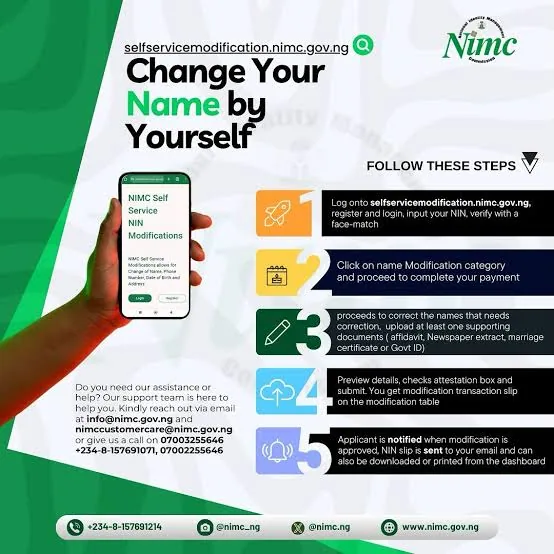
The National Identity Management Commission (NIMC) has launched a digital self-service portal, enabling Nigerians to modify critical details linked to their National Identification Number (NIN) without visiting physical enrollment centers. The move aims to streamline processes, reduce overcrowding at offices, and curb potential extortion by third-party agents. Key Details Eligible for ModificationThe portal allows citizens to update four categories of personal information: Name changes (due to marriage, legal reasons, or personal preference). Date of birth corrections (limited to one adjustment to fix registration errors). Phone number updates (if a linked number is lost or changed). Address modifications (to reflect current residency). However, permanent data such as gender, NIN, fingerprints, and registration location remain uneditable. Required Documents for Each UpdateTo prevent fraud, NIMC mandates specific documents for each modification type: Name Change: Court affidavit, marriage certificate, or newspaper extract. Date of Birth: Digitized birth certificate (for those born after 1992) or National Population Commission (NPC) attestation (for those born earlier). Phone Number: Police report and proof of new number ownership. Address Change: Utility bill, tenancy agreement, or community leader’s attestation letter. Step-by-Step Process for Online Updates Visit the Official Portal: Access NIMC’s Self-Service Portal—the only platform authorized for modifications. Register or Log In: New users must create an account using their NIN-linked name and phone number. Existing users log in directly. Facial Verification: The portal scans your face to confirm identity, replacing physical biometric checks. Select Modification Type: Choose the field to update (name, DOB, etc.) and upload scanned copies of required documents. Pay Fees: Name/Address/Phone Number: ₦1,522.50 (excluding payment gateway charges). Date of Birth: ₦16,340 (reflects higher scrutiny for age adjustments). Track & Download: Applications are processed within days. Approved updates let users download revised NIN slips instantly. NIMC Director-General Engr. Abisoye Coker-Odusote emphasized the portal’s secure design, urging Nigerians to avoid unauthorized third-party sites: “This system eliminates bottlenecks, ensures transparency, and protects data from identity theft.” The commission warns that non-official platforms risk exposing users to scams or data breaches. With over 104 million NINs issued as of 2024, the digital shift addresses longstanding complaints about delays and corruption at physical centers. It also aligns with Nigeria’s push to integrate digital ID into banking, telecoms, and government services. For citizens, the portal offers 24/7 access, faster processing, and reduced costs compared to agent-assisted updates. Those uncertain about their registered details can first retrieve them via NIMC’s NIN Card Retrieval Service.